Choosing and deploying bot detection in 2026
The complete buyer’s guide: evaluate detection layers, integration, response, legitimate-user friction and cost. Use the same pilot conditions for every candidate.
How Does a Layered Bot Detection Check Work?
A layered bot detection check works by gathering evidence at several levels and looking for contradictions between them, because every single signal in this category has a published bypass. The network shows where a request comes from, client checks show what the browser really is, and behavior over time shows whether one actor keeps returning.
- Network layer: IP reputation, ASN, and connection type separate datacenter, residential, mobile, proxy, and Tor traffic. It is cheap and instant, and it is the layer residential-proxy rotation defeats fastest.
- Protocol layer: TLS and HTTP/2 characteristics expose a scripted HTTP client that claims to be a desktop browser.
- Client layer: a JavaScript check reveals headless flags, automation-framework artifacts, and browser APIs that disagree with each other; server-side verification keeps a tampered client from forging a clean answer.
- Behavior layer: navigation timing, request velocity, and interaction patterns catch bots that pass every static test.
- Identity layer: recognizing a returning device links one operator across sessions after IPs and cookies change.
The output should be a graded score with reasons, because a single bot flag cannot tell a scraper from a search crawler.
How to Detect Bots
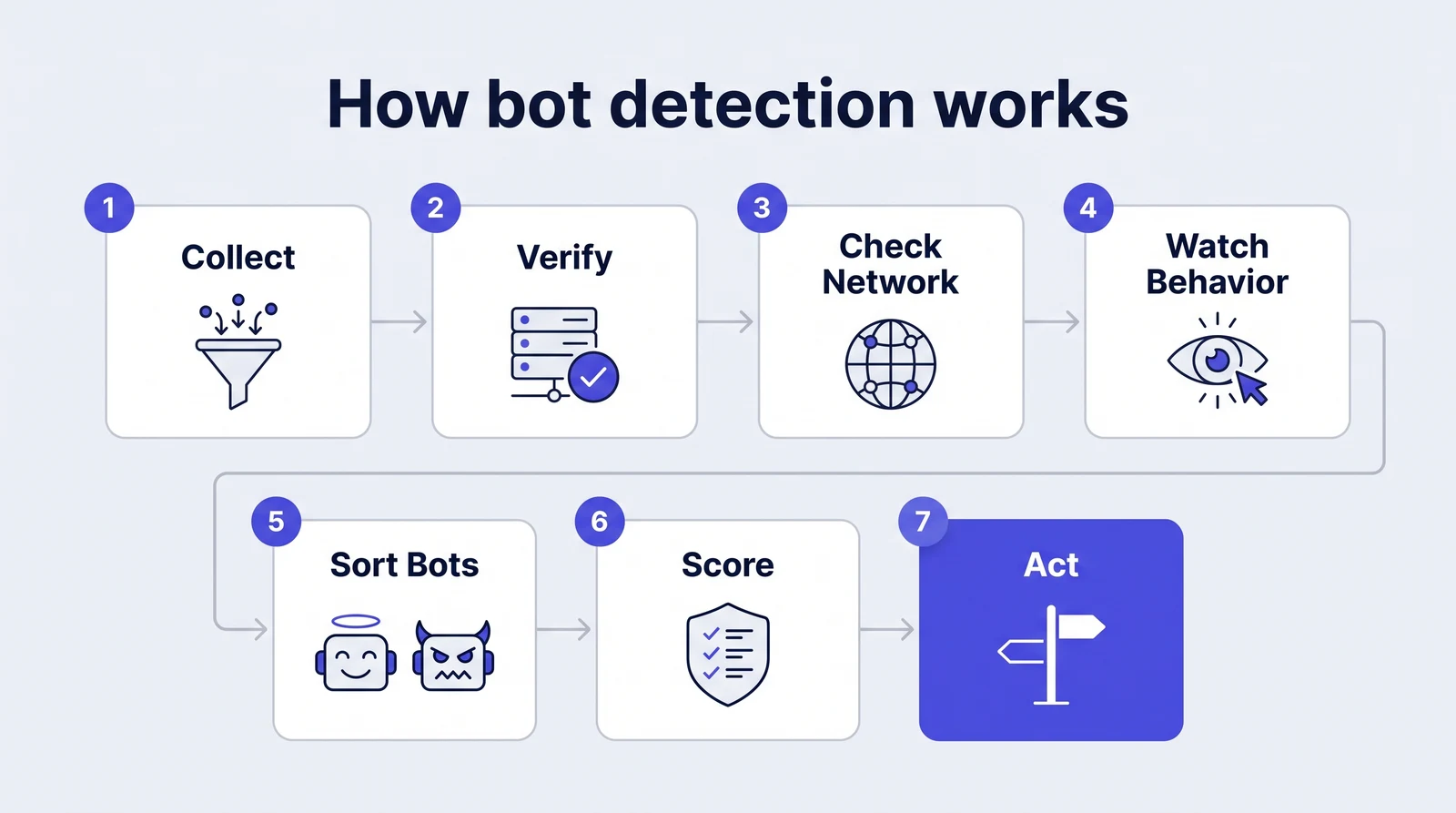
To detect bots, work through seven steps in order: collect client-side evidence with a JavaScript check, confirm it on the server, classify the network, compare behavior across sessions, verify declared crawlers and AI agents, merge everything into one risk score with reasons, and act by risk level rather than challenging everyone.
- Collect. Run a lightweight JavaScript check on sensitive pages to gather browser, device, and runtime signals, including headless and automation-framework artifacts.
- Verify server-side. Fetch the verdict from your backend by request ID, so a tampered client cannot forge a clean result.
- Check the network. Classify the IP as residential, mobile, datacenter, proxy, VPN, or Tor, and compare its location with the browser timezone and locale.
- Watch behavior. Compare request velocity, navigation timing, and repeat identities across sessions to link bots that rotate IPs and fingerprints.
- Sort good bots. Verify declared crawlers and AI agents by signed agent, published IP range, or reverse DNS before scoring the rest.
- Score and explain. Combine every signal into one weighted risk score with named reasons instead of a single bot=true flag.
- Act by risk level. Allow low risk, rate-limit or challenge medium risk, and block high risk at login, signup, checkout, and API endpoints.
What Is the Difference Between Bot Detection, a CAPTCHA, a WAF, and Analytics Bot Filtering?
These four answer different questions. Bot detection decides whether a request is automated and why; a CAPTCHA is a challenge served to a user already under suspicion; a WAF blocks requests that match known attack signatures; and analytics bot filtering only removes obvious crawlers from reports after the traffic has already reached the site.
- CAPTCHA: a mitigation step rather than detection. Commercial solving services price their way through it, and every puzzle costs some real users.
- WAF rules: strong on known signatures and injection payloads, weak on a genuine browser driven by a script.
- Analytics filtering: cleans the dashboard, but nothing is scored, identified, or stopped.
- Bot detection: a per-request or per-session verdict that a CDN rule, a WAF, or an application checkpoint can act on.
Most production stacks pair one detection layer with one enforcement point.
How are AI agents changing bot detection?
AI traffic includes declared crawlers, direct HTTP clients and agents operating a browser. Match the detection method to the surface, verify identity claims separately and apply permissions to the action. Useful automation needs a policy alongside abusive activity.
Akamai now distinguishes AI training, search and fetcher or agent categories. Fingerprint documents separate browser and HTTP automation methods, and Arkose separates agent-trust and bot-management products. Read the AI-bot evaluation guide for a task-based test matrix.
How Do You Integrate Bot Detection?
You integrate bot detection in one of three shapes: an edge or CDN module that inspects requests before they reach your origin, a JavaScript tag with server-side verification, or a server-side API called at sensitive endpoints. The shape decides latency, which parts of the stack see the verdict, and how quickly you can go live.
- Edge or CDN module: no application change and inline blocking, but it usually ties you to one network provider and sees only what reaches the edge.
- JavaScript tag plus server verification: collects browser and device evidence in the page; the backend fetches the verdict by request ID, so the client cannot fake it.
- Server-side API: called from login, signup, password reset, checkout, and the pricing or inventory APIs that scrapers target.
Start in monitor-only mode for a week and compare flags with known-good traffic. Then enforce endpoint by endpoint, decide whether a vendor timeout fails open or closed, and keep a one-click rollback.
What Should You Do When a Visitor Is Flagged as a Bot?
When a visitor is flagged as a bot, match the response to the risk level and to the endpoint instead of applying one global block. Low risk passes untouched, medium risk gets a rate limit or an invisible challenge, and only high risk with corroborating evidence is blocked outright or served a decoy response.
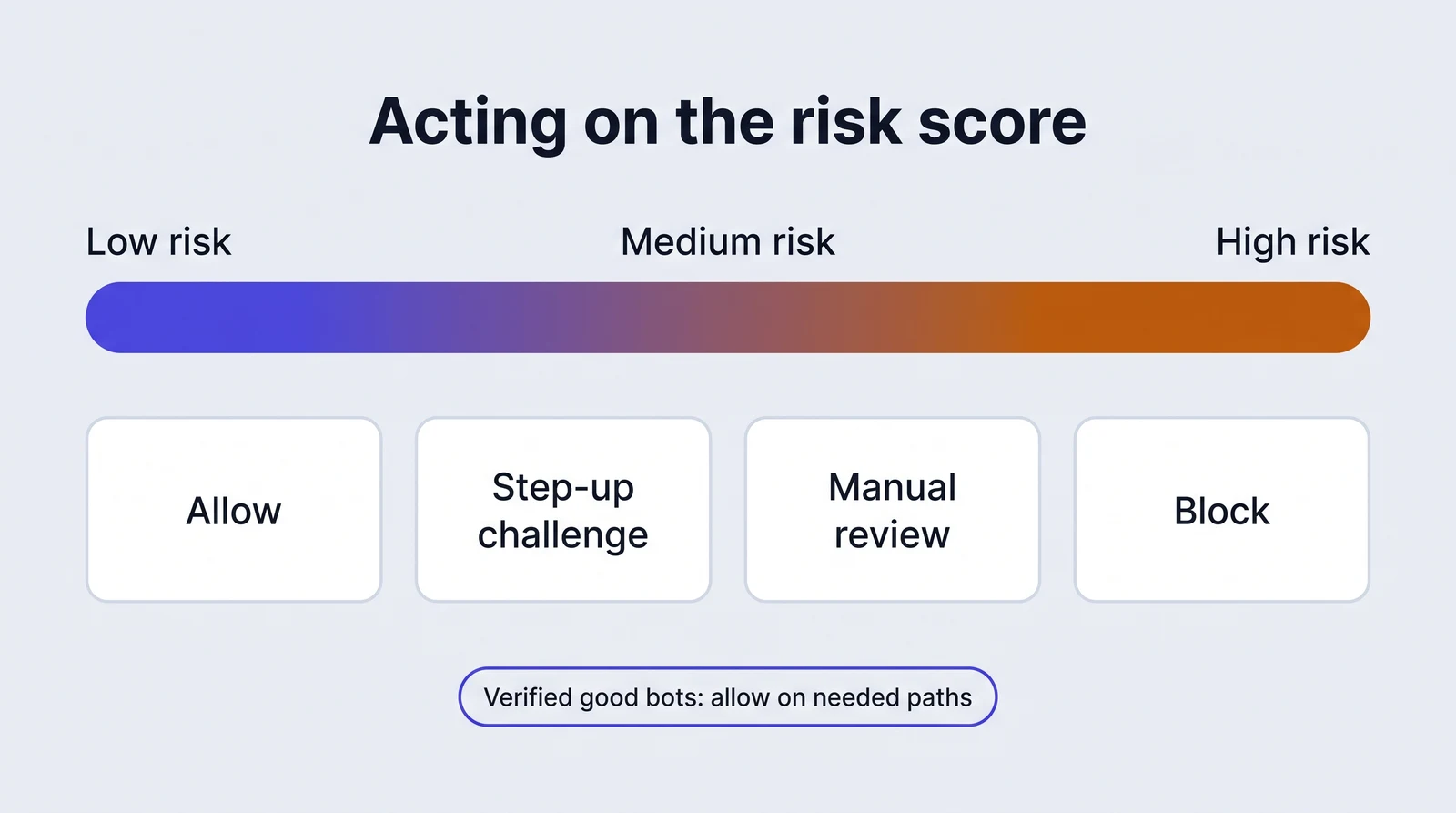
- Low risk: allow with no friction and keep the result for later analysis.
- Medium risk: rate-limit, add a step-up check such as email verification at signup, or serve an invisible challenge.
- High risk on one signal: slow the session down and send it to review rather than blocking a possible customer.
- High risk with corroboration: block, tarpit, or serve cached or decoy content to a scraper so the operator learns nothing.
- Verified good bots: allow on the paths they need and hold them to a published crawl budget.
Log the reason with every decision, so support can explain a false positive and release a wrongly flagged customer in minutes.
How Much Does Bot Detection Cost at Your Volume?
Compare the events your integration actually bills. Identifications, assessments and edge requests describe different work; include the relevant routes, repeat checks, feature access and billing period.
| Tool | Free access | Paid pricing and unit |
|---|---|---|
| ShieldLabs | 5,000 free identifications, API access, no card | 99 US dollars per month for 25,000 identifications; 79 US dollars per month billed yearly Pricing source |
| DataDome | No ongoing free production tier listed | Essentials: 3,830 US dollars per month; Advanced: 8,670; Premium: 10,160; Enterprise from 13,270 Pricing source |
| Cloudflare Bot Management | Enterprise Bot Management is a separate product; free Bot Fight Mode is narrower | Enterprise subscription and Bot Management commercial terms Pricing source |
| HUMAN | No public free production allowance in the reviewed onboarding and usage documentation | Commercial quote; Bot Defender licensing uses Monthly Requests Pricing source |
| Kasada | No ongoing free direct Kasada production tier stated on the reviewed product page | Commercial evaluation and quote Pricing source |
| Imperva Advanced Bot Protection | No ongoing Advanced Bot Protection allowance established by the reviewed product page | Commercial quote and deployment scope Pricing source |
| Akamai Bot Manager | No ongoing public free Bot Manager production plan established by the reviewed sources | Commercial quote; Premier can accompany App & API Protector or be purchased alone Pricing source |
| Arkose Labs | No ongoing public free Bot Manager production allowance established by the reviewed sources | Commercial quote and selected Titan product scope Pricing source |
| Fingerprint | Up to 1,000 API calls per month; a 14-day Pro Plus trial is listed separately | Pro Plus: 99 US dollars per month for 20,000 API calls, then 4 US dollars per 1,000 additional calls Pricing source |
| reCAPTCHA Enterprise | 10,000 assessments per calendar month under documented billing conditions | Premium: 8 US dollars flat for 10,001–100,000 monthly assessments, then 1 US dollar per 1,000; Enterprise uses volume commitments Pricing source |
Include integration work, investigation and the effect of visible challenges on legitimate completion. The free-tool guide explains trials and feature access.
Which Bot Detection Tool Fits Which Scenario?
Choose by the protected action and the layer where the result is needed. Use the deployment alternatives to shortlist comparable candidates.
- ShieldLabs: Self-serve teams protecting signup, login, checkout and account access with bot, identity and account-risk context.
- DataDome: Teams buying managed bot protection for high-volume websites and APIs across an existing edge stack.
- Cloudflare Bot Management: Organizations already using Cloudflare that want bot classification and policy at the network edge.
- HUMAN: Security and fraud teams that want an assisted bot-defense deployment and investigation workflow.
- Kasada: Teams prioritizing managed automation defense with invisible client validation and limited rule maintenance.
- Imperva Advanced Bot Protection: Organizations consolidating bot protection with a broader application-security and WAF program.
- Akamai Bot Manager: Enterprises already on Akamai or buying bot management with edge application protection.
- Arkose Labs: Teams that want adaptive challenge-based protection alongside bot and agent detection for account journeys.
- Fingerprint: Engineering teams combining device identification with documented browser-bot signals and application workflows.
- reCAPTCHA Enterprise: Teams that want action-level risk assessments and selective challenges with Google Cloud billing.
What Should You Verify Before Buying a Bot Detection Tool?
Before buying a bot detection tool, run a bake-off rather than trusting a demo: put a week of your own traffic through the top two or three candidates, seed known bots, headless sessions, and AI agents behind residential proxies, and measure detection rate, false positives on real users, latency, and integration effort.
- What happens under full rotation? Change IP, fingerprint, headers, timing, and automation framework at once and see what still gets caught.
- How are verified crawlers and declared agents handled? Search and monitoring bots should pass without an allowlist fire drill.
- What does the verdict contain? A graded score with reasons beats allow or deny.
- Can a tampered client forge the result? Client-side checks should be verified on the server.
- What latency is added? Measure inside the real login path under burst load.
- Is there a monitor-only mode? And can enforcement be rolled back per endpoint?
- Which accuracy numbers are independent? Treat vendor-run benchmarks as claims.
- What is the cost per protected request? Include conversion lost to challenges.
How Do You Test Bot Detection Tools for False Positives on Real Visitors?
Put the candidates on the same live routes and compare them on the humans they wrongly challenge, not only on the bots they catch. A shared sample keeps the comparison fair, and it shows which tool costs you the fewest real customers for the automation it stops.
- Send the same sessions to every tool. Duplicate the same logins, signups, and checkouts so each tool sees identical traffic.
- Collect the human side first. Completed purchases, verified customers, and logged-in users with a history make your known-human sample.
- Include unusual but legitimate visitors. Screen-reader users, corporate proxies, privacy browsers, and slow connections are the visitors most likely to be challenged by mistake.
- Check good bots separately. Search crawlers and uptime monitors you allow should pass, so count them apart.
- Read the reasons. A tool that returns per-signal reasons lets you find why a human was flagged and fix your handling instead of guessing.
For example, a team that sees a tool challenge screen-reader users can check the named signals behind those visits before choosing between that tool and another.
Continue with a focused guide
- How to detect bot traffic on your website
- CAPTCHA alternatives for login and signup protection
- Headless browser detection: a practical evaluation guide
- How to detect AI bots and browser agents
- How to verify good bots without trusting the user agent
- Free bot detection tools: compare the features and limits
Explore checkers, demos and evaluation routes →